
TOURNAMENTS
Brick City Tournament
Friday, November 27 - Sunday, November 29, 2026

Victoria Recreation Center &
Chaska Community Center
Squirts & Snipes Tournament
Friday, December 11-Sunday, December 13

511 Ice Arena Dr, Princeton, MN 55371
squirtacular tournament
Tuesday, December 29 - Sunday, January 3

Blaine, MN
The Great Lake Skate Tournament
Friday, February 5 - Sunday, February 7

Sonju Arena
301 8th Ave, Two Harbors, MN
game day volunteers
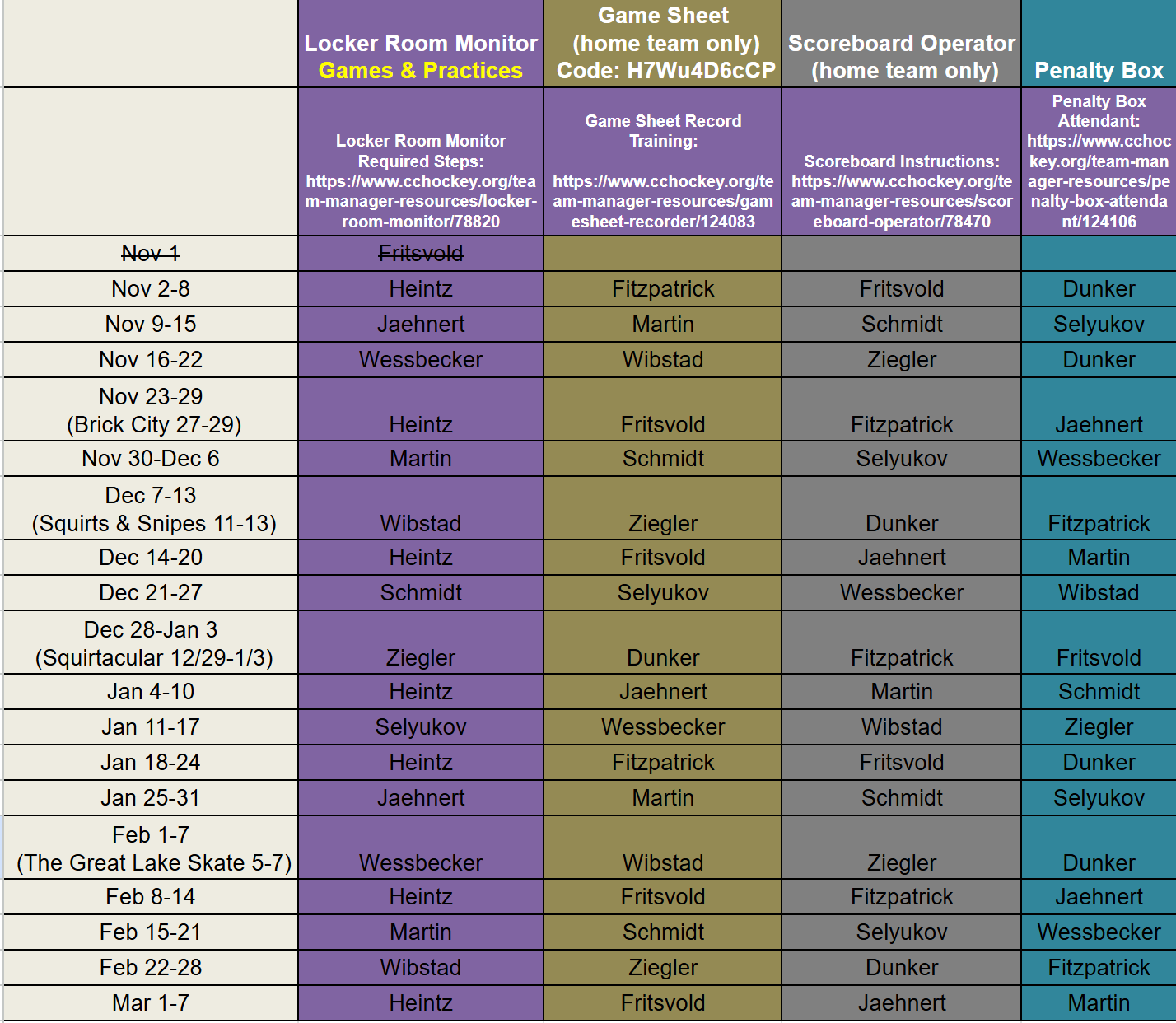
scoreboard operator
Time Clock Instructions
TURNING ON THE CLOCK
- Turn the power switch on
- Both rinks have a main switch in the back room that is usually on. If the scoreboard won’t turn on, check this switch.
- RINK 1 - The switch is next to the control panel on top of the table.
- RINK 2 – Plug in the loose cord into the outlet on the wall.
- Wait for the control panel to say, “Enter Code”.
- Press “#62” and “ENTER"
- The readout will now say “1/10 second?”
- Press “ENTER” again.
Setting Game Time
- Hit the SET MAIN CLOCK button.
- Type in the time and hit the ENTER button.
- (Ex. 5 minutes, type in 5000. Check the display on the scoreboard control)
- To run the time hit the START button.
- To stop the time hit the STOP button.
- To enter the periods, hit the PERIOD+ button until you have the desired period on the scoreboard.
- To reset the time after a period hit the SET TIME button and then the ENTER button. The previous period time will be entered automatically. If you need to enter a different time length repeat steps 1 & 2 with the new time.
Entering Penalities
- Hit the PLAYER/PENALTY button.
- Hit the ENTER button.
- Type in the player number.
- (This will not show on some scoreboards)
- Hit the ENTER button.
- Type in the penalty time.
- (Ex. A 1:30 penalty, hit 130. Always double check the scoreboard control display)
- Hit the ENTER button.
Removing Penalties
- Hit the PLAYER/PENALTY button.
- Hit the UP-ARROW key until the penalty you need to remove shows on the scoreboard control display.
- Hit the CLEAR button.
Gamesheet Recorder
All games are now scored electronically via Gamesheet. Each rink is equipped with iPads and are set up for scoring on Gamesheet. You must use an iPad to complete a Gamesheet.
CODE: Squirt B2 WhiteH7Wu4D6cCP